
RECIPE.md
This file is the brief: enough to build Pasture from an empty folder. The files next to it are one build of it. If they don’t work on your Herdr, or you want it different, build it again from here.
What you see
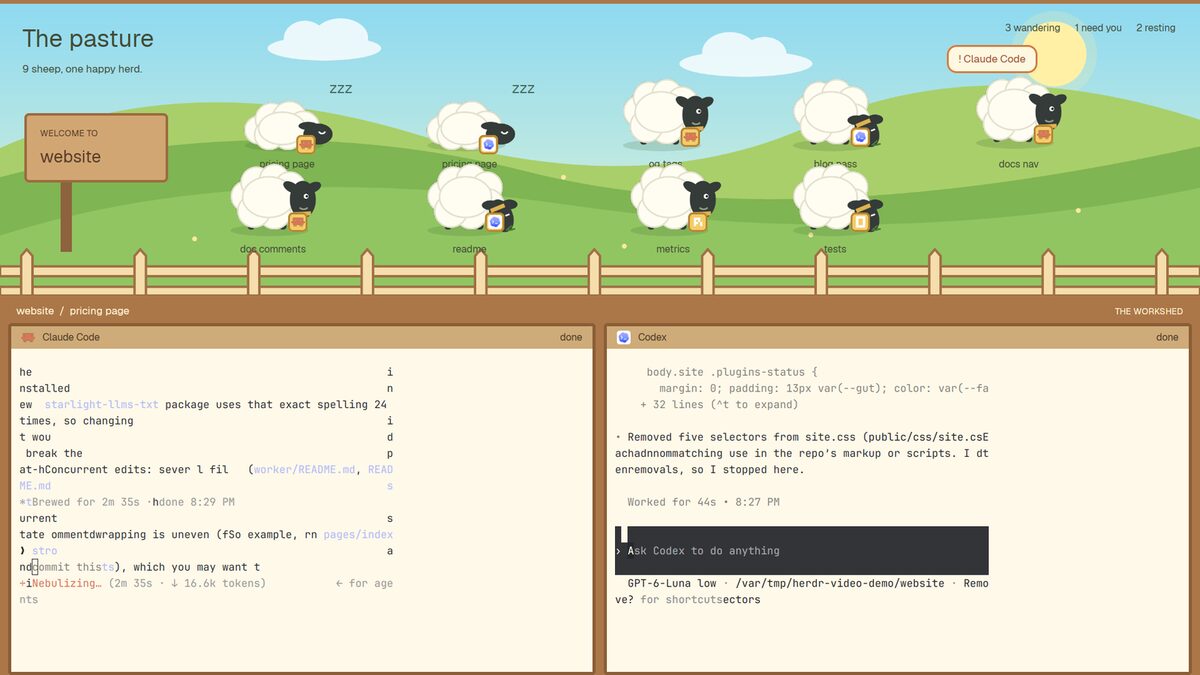
Three bands, top to bottom, filling the window (no title bar):
- The pasture, about 45% of the height. A sky-to-grass meadow with hills,
clouds, a sun and a wooden fence along the bottom edge.
- Top left: “The pasture” (30px, extra bold) and under it “9 sheep, one happy herd.” with the real count.
- Left: a wooden sign on a post, “WELCOME TO” and the active space’s name.
- Top right: three counts, “3 wandering”, “1 need you”, “2 resting”.
- One sheep per agent, in two rows of five, each with the agent’s tab name under it and the agent’s program icon on a small yellow tag at its neck.
- The rail, 29px of wood (
#ab7748): “space / tab” on the left in cream, “THE WORKSHED” on the right. - The workshed, the rest: the active tab’s terminals side by side on
wood, each in a cream pane (
#fff9e9) with a thick dark wood frame (#8b5e37, 4px) and a tan header (#ceab78, 28px) showing the program’s icon, its name, and its status on the right (“needs you” for blocked).
Colors: light, warm, cartoon. Ink #414b34, wood #ab7748, sign #d2a673,
tags #f4cc68. Text in Geist.
How it behaves
Every sheep shows its agent’s status:
| Status | Drawing | Motion | Extra |
|---|---|---|---|
| working | standing sheep | drifts left and right, eased over ~4s | |
| blocked (needs you) | standing sheep | bounces up and down, fast | a bubble above: ”! Claude Code” in orange |
| done | sleeping sheep, lying down | none | ”zzz” beside it |
| idle | grazing sheep, head down | bobs slowly |
- Clicking a sheep focuses that agent: its space and tab become active, so its terminals fill the workshed and the rail and sign update.
- The counts and the sign follow the agents live.
- The app’s “next agent” keys walk the sheep in the order they stand.
Built from
- The layout file (
layouts/pasture.json): a rootcolumnwith"titlebar": "none", its owntheme(paper) andcolors, then three children: ablockshowing the mod (size: { weight: 0.85 }), ablockshowing the mod withprops: { role: "rail" }(size: { px: 29 }), and ablockwithcontent: { tab: "active", pane: { … } }for the terminals, whosepane.headeris the same mod withprops: { role: "pane" }. - One mod (
mods/pasture/) that draws all three parts, picked byprops().role: none for the pasture,rail, orpane(it also getsprops().paneto find its terminal inpanes()). - Data:
agents()for the herd (status, program, tab name, address),spaces()for the active space and tab,panes()for the pane headers. - Commands:
run("agent.focus", { terminal })on click,setAgentOrder(addresses)on every render. - Motion:
.transition("left", …)for the drifting,.loop("top", …)for bouncing and bobbing. A timer every ~4s only moves the drift target. - Art: four SVGs, the meadow and three sheep poses (standing, grazing,
sleeping), drawn flat with simple shapes. The program icon comes from the
agent’s
program.icon(tint it whenprogram.tintis set).
Watch out
- Animate natively. Let
.transitionand.loopdo the moving; never redraw on a fast timer to animate. The drift timer changes data, not frames. - Sheep positions are fixed pixels tuned for a window about 1400px wide. Mods don’t know their block’s size, so on a narrow window the right column runs off the edge; use fewer per row or smaller sheep if you need it.
- Ten sheep fit. Plan a third row if you run more agents.
- Key sheep by the agent’s address, not its index, or they swap places when an agent starts or ends.
- Asset paths are
mods/pasture/…. Renaming the mod’s folder means renaming those paths and themodnames in the layout. - The layout brings its own colors and ignores the person’s theme. Drop
themeandcolorsfrom it to follow theirs.
Done when
- Every agent is a sheep with its tab name, and the counts add up.
- Changing an agent’s status changes its sheep within a moment: a stuck agent bounces with its bubble, a finished one falls asleep.
- Clicking a sheep shows its terminals in the workshed, and the rail and the sign name its space and tab.
herdr-app check mods/pasturepasses, and switching to another layout and back works.